From Unstructured Emails to Structured Data: How AI Understands Business Documents
Discover how AI transforms unstructured emails and business documents into structured data, reducing manual work and simplifying business workflows.


How Does AI Read Emails and Documents?
Every day, businesses receive important information through emails, invoices, purchase orders, contracts, scanned documents, and PDF attachments. These documents contain valuable business information, but much of it is not organized in a format that software can directly understand.
For example, a supplier sends an invoice through email. An employee opens the message, downloads the attachment, identifies the supplier's name, invoice number, date, and total amount, and manually enters the information into an ERP system.
Now imagine repeating this process for hundreds of emails and documents every month.
Manual document handling can become time-consuming, especially when businesses manage information across multiple departments and applications.
This is where AI-Powered Email Automation, Intelligent Document Processing, and Unstructured Data Extraction can help.
Artificial intelligence can identify important information within business emails and documents, extract relevant details, and organize them into structured data.
With AI Document Processing, businesses can reduce repetitive data entry, improve document organization, and prepare information for existing business applications.
Companies can also explore Workflow Automation Solutions and Enterprise System Integration to connect document processing with their daily operations.
YellowChunks focuses on transforming unstructured emails and business documents into structured, actionable information.
Let's understand how this works and why businesses are increasingly exploring AI-powered document automation.
What Is Unstructured Data?
Unstructured data is information that does not follow a consistent or predefined format.
Businesses receive unstructured information through emails, PDF attachments, invoices, contracts, purchase orders, customer messages, and scanned documents.
For example, three suppliers may send invoices containing similar information.
However, each invoice may follow a different layout.
One supplier may place the invoice number at the top of the document. Another may display it near the billing address. A third may send a scanned invoice with the details arranged differently.
Although these documents contain similar information, traditional software may struggle to identify it consistently.
Employees must manually read each document and extract the required details.
This creates repetitive work and can delay administrative processes.
Unstructured Data Extraction helps businesses identify relevant information within documents that do not follow a fixed format.
By using Intelligent Document Processing, organizations can classify different documents, extract selected fields, and organize the information for further processing.
For businesses handling large volumes of emails and attachments, AI-Powered Email Automation can also help identify incoming document requests and support their processing.
What Is Structured Data?
Structured data is information organized into clearly defined fields that software can store, search, validate, and process.
Consider a supplier invoice.
The original document may contain several details, including the supplier's name, invoice number, date, purchase order reference, and total amount.
When these details are extracted and organized into separate fields, they become structured data.
For example:
Data Field | Extracted Information |
Supplier Name | ABC Trading |
Invoice Number | INV-2026-105 |
Invoice Date | 12 November 2026 |
Purchase Order | PO-4582 |
Total Amount | AED 8,500 |
Currency | AED |
Illustrative examples using fictional business information.
This structured information can be reviewed and prepared for use in an ERP, accounting platform, or another business application.
AI-Powered Document Data Extraction helps convert information from emails and documents into organized fields.
With suitable Enterprise System Integration, validated information can be transferred into approved business systems.
Businesses may also use Custom Software Development to connect document processing workflows with applications that have specific data requirements.
The objective is to make information easier to access, verify, and use.
Why Is Manual Document Processing Slow?

Many businesses still depend on employees to manually process emails and documents.
An employee receives an email, opens the attachment, reads the information, and enters the details into another system.
Although this approach may work for a small number of documents, it becomes difficult to manage when document volumes increase.
Repetitive data entry
Employees often enter the same types of information repeatedly.
For example, an accounts payable team may process supplier invoices every day.
Each invoice requires the employee to identify the supplier's name, invoice number, date, and amount.
AI Document Processing can help reduce this repetitive work by extracting selected information automatically.
Data entry errors
Manual entries can introduce mistakes.
An employee may copy an incorrect invoice number, overlook a field, or enter the wrong amount.
Intelligent Document Processing can support data extraction and validation, although important information still requires appropriate checks.
Delayed document processing
When employees receive more documents than they can process, pending work may accumulate.
Workflow Automation Solutions can help organize incoming requests and route documents through defined processes.
Difficult document searches
Important information may be stored across different email inboxes and attachments.
AI-Powered Email Automation can help classify incoming communication and make document-related information easier to organize.
Limited workflow visibility
When information remains inside unstructured documents, employees may struggle to understand the status of pending requests.
Unstructured Data Extraction helps convert relevant information into structured records that can support tracking and reporting.
These challenges explain why organizations are exploring AI-Powered Business Solutions for document-heavy operations.
How Does AI Understand Emails?
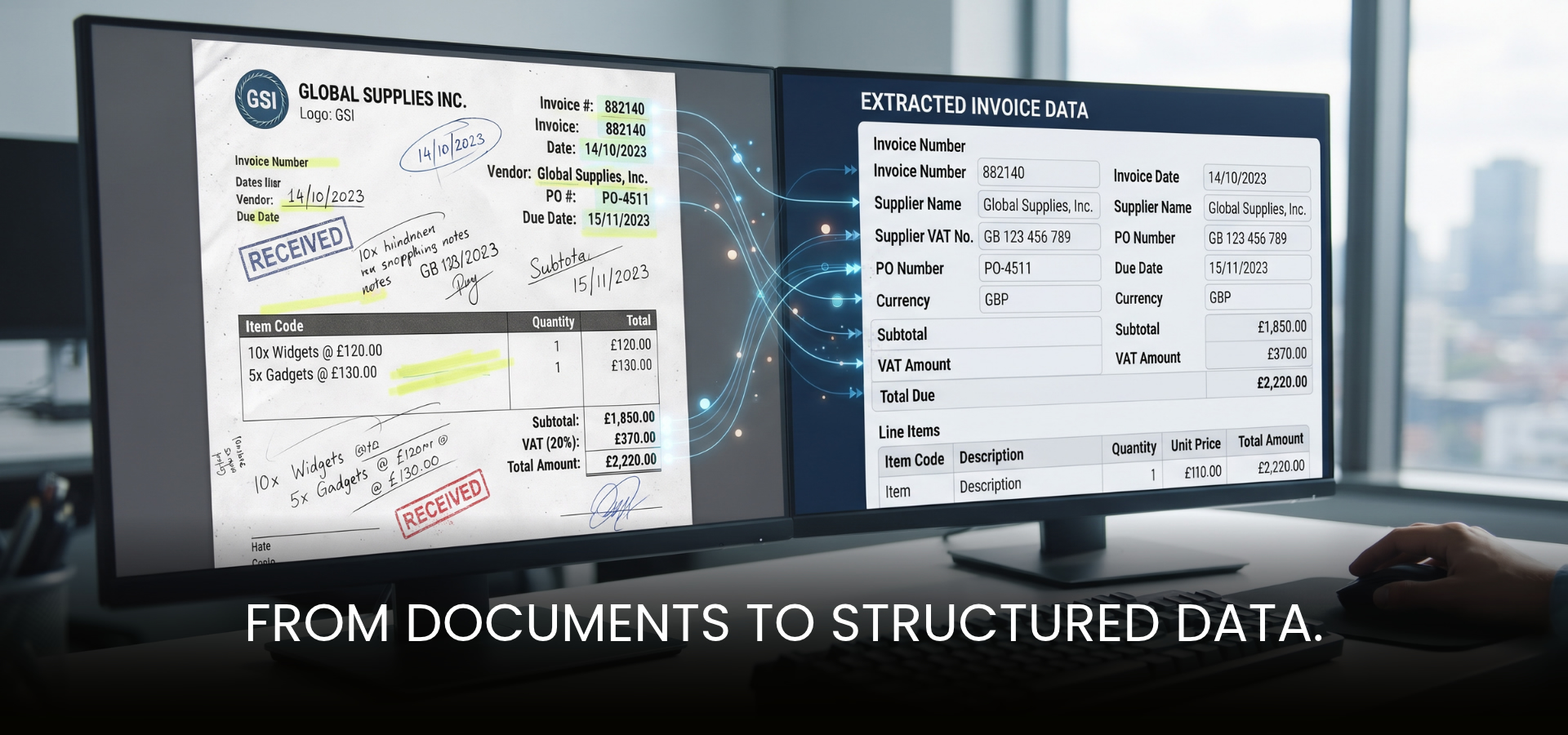
Businesses receive emails containing invoices, purchase orders, customer inquiries, approvals, and document requests.
However, the wording and structure of these messages can vary significantly.
For example, one supplier may write:
Please find the invoice attached for processing.
Another supplier may write:
Attached is the billing statement for the services completed last month.
Although the messages use different words, both may relate to invoice processing.
AI-Powered Email Automation can help identify the purpose of these messages by analyzing their content.
Email classification
AI can examine the subject line, message body, and available attachment information.
It can then help classify the email according to its likely purpose.
For example, a message may be categorized as an invoice of submission, purchase order, customer inquiry, or document request.
Information extraction
After identifying the message category, AI-Powered Document Data Extraction can help capture relevant information.
This may include supplier names, reference numbers, dates, and requested actions.
Attachment processing
Important information is often stored inside PDF attachments rather than the email body.
Intelligent Document Processing can help analyze supported attachments and extract selected details.
Workflow routing
After extraction, Workflow Automation Solutions can help organize the information and direct it to the appropriate review process.
Business system connectivity
With suitable Enterprise System Integration, validated information can support existing accounting, procurement, or operational applications.
This approach helps businesses move from manual email handling toward more organized information processing.
How Does AI Extract Data from Documents?

AI Document Processing uses technologies such as Optical Character Recognition (OCR), natural language processing, and machine learning to interpret document content.
The process involves several stages.
Step 1: Receive the document
A document arrives through email, an upload, or another approved channel.
The document may be an invoice, purchase order, contract, or business form.
AI-Powered Email Automation can help identify incoming messages that contain documents requiring processing.
Step 2: Identify the document type
The system attempts to classify the document.
For example, it may distinguish an invoice from a purchase order.
This classification helps determine which information should be extracted.
Step 3: Read the content
Digitally generated documents may contain machine-readable text.
Scanned documents may require OCR to recognize the visible characters.
Intelligent Document Processing combines text recognition with document understanding.
Step 4: Extract important information
AI-Powered Document Data Extraction can identify selected fields such as supplier names, invoice numbers, dates, and amounts.
Step 5: Organize structured data
The extracted information is arranged into predefined fields.
This creates a structured record that software can be used.
Step 6: Validate the results
The workflow can check for missing information, unexpected values, or uncertain extraction results.
Employees can review exceptions before the information is used.
Step 7: Connect with business applications
With appropriate Enterprise System Integration, validated information can be prepared for use in existing systems.
Organizations with specialized requirements may use Custom AI Solutions and Custom Software Development to support their workflows.
This process helps turn document-based information into more useful business data.
What Is Intelligent Document Processing?
Intelligent Document Processing (IDP) is the use of AI and related technologies to classify documents, extract information, and support validation.
Traditional document processing often relies on fixed templates.
For example, a system may expect an invoice number to appear in the same location on every invoice.
However, businesses receive documents from different suppliers and customers.
Each organization may use a different format.
Intelligent Document Processing can help recognize important information across varied layouts.
Document classification
The system identifies the likely document category.
For example, it may classify a file as an invoice, purchase order, or contract.
Data extraction
AI-Powered Document Data Extraction captures relevant information from the document.
The required fields depend on the document type.
Data validation
The extracted information can be checked against predefined business rules.
For example, a workflow may identify missing invoice numbers or incomplete supplier details.
Workflow automation
Workflow Automation Solutions can help direct validated documents to the next administrative stage.
System integration
Enterprise System Integration can help connect structured document information with existing business applications.
When implemented with appropriate controls, AI Document Processing can reduce repetitive administrative work while maintaining human oversight.
Can AI Read PDFs and Invoices?
Yes. AI can help extract information from supported PDF documents and invoices.
Businesses frequently receive supplier invoices through email.
These documents may contain supplier information, billing details, purchase order references, line items, and total amounts.
Manually extracting this information can be time-consuming.
AI-Powered Email Automation can help identify incoming invoice-related messages.
Intelligent Document Processing can then help analyze the attached document.
Through AI-Powered Document Data Extraction, the system may identify important fields such as invoice number, supplier name, date, and amount.
The extracted information can be organized into structured records.
If required information is missing or uncertain, the document can be flagged for review.
How AI helps accounts payable teams
Accounts payable employees often process invoices from multiple suppliers.
AI Document Processing can reduce the need to manually enter every field.
Workflow Automation Solutions can support document routing and exception handling.
With suitable Enterprise System Integration, validated invoice information can be prepared for accounting or ERP applications.
However, invoice extraction should not automatically replace financial verification, matching, or payment of approval procedures.
The goal is to simplify information handling while preserving business controls.
How Does AI Help ERP Systems?
ERP systems support business activities such as finance, procurement, inventory, and operations.
These systems depend on structured information.
However, important business data often arrive through emails, invoices, and PDF attachments.
Employees may need to manually transfer this information into ERP applications.
AI-Powered Document Data Extraction can help bridge the gap between incoming documents and structured ERP records.
For example, an invoice may arrive by email.
AI-Powered Email Automation can help identify the message.
Intelligent Document Processing can extract the relevant invoice details.
The information can then be validated and prepared for use in the ERP system.
Enterprise System Integration
Enterprise System Integration helps connect information between approved business applications.
For document processing, this may involve transferring validated invoice fields into an accounting workflow.
Custom Software Development
Some businesses use specialized applications that require additional integration of work.
Custom Software Development can help build connections between document processing systems and existing software.
Custom AI Solutions
Organizations may have document formats or validation requirements that differ from standard workflows.
Custom AI Solutions can be designed to address these requirements.
Workflow Automation Solutions
Workflow Automation Solutions can support document routing, validation, and exception handling.
By combining AI Document Processing with suitable system integration, businesses can reduce repetitive data entry and improve information flow.
What Are the Benefits of AI Document Processing?
Businesses can gain several benefits from adopting AI Document Processing and AI-Powered Email Automation.
Reduced manual work
AI-Powered Document Data Extraction helps reduce the need for employees to manually copy information from emails and documents.
Faster information processing
Intelligent Document Processing can help identify and organize document information more efficiently.
Better data consistency
Structured extraction and validation can reduce some common data entry errors.
Improved document organization
Unstructured Data Extraction helps make important information easier to locate and use.
Easier workflow management
Workflow Automation Solutions can help route documents and organize administrative activities.
Better system connectivity
Enterprise System Integration can support information transfer between approved applications.
More flexible business processes
Custom Software Development and Custom AI Solutions can help organizations address specialized processing requirements.
Improved operational efficiency
AI-Powered Business Solutions can help employees spend less time on repetitive administrative tasks and more time on activities requiring judgment.
The actual benefits depend on document quality, implementation, and the organization's existing processes.
Is AI Document Processing Accurate?
AI Document Processing can provide useful extraction results, but accuracy depends on several factors.
Document quality, layout complexity, language, and system configuration can influence performance.
For example, a clear digital invoice may be easier to process than a blurred scanned document.
Similarly, a document containing multiple dates or amounts may require additional interpretation.
Intelligent Document Processing can help identify relevant fields, but errors remain possible.
A system may select the wrong date or misinterpret a table.
This is why validation is important.
Automated validation
Workflow Automation Solutions can apply rules to identify missing or inconsistent information.
Human review
Employees should review uncertain extraction results and important transactions.
Business-specific requirements
Custom AI Solutions can help address specialized document formats and extraction requirements.
Continuous improvement
Organizations should monitor extraction of quality and recurring errors.
AI-Powered Business Solutions should be evaluated based on reliable processing outcomes, not simply the number of documents handled.
The objective is to reduce repetitive work without removing necessary oversight.
How Can Businesses Start Using AI?
Businesses interested in AI-Powered Email Automation and Intelligent Document Processing should begin with a clearly defined problem.
For example, an organization may want to reduce manual invoice entry.
Another may want to classify incoming customer emails or extract information from purchase orders.
Identify repetitive processes
Review business activities that require employees to read documents and manually enter information.
Select the right documents
Choose a document type with clearly defined extraction requirements.
Supplier invoices are one possible starting point.
Define the required information
Identify which fields need to be extracted and validated.
Test AI Document Processing
Use realistic documents with different layouts and formats.
This helps evaluate extraction quality.
Plan Enterprise System Integration
Determine whether structured information needs to be related to an ERP, accounting, or procurement system.
Consider Custom Software Development
Businesses with specialized systems may require additional integration capabilities.
Explore Custom AI Solutions
Some organizations may need business-specific extraction, validation, or document classification of workflows.
Measure the results
Evaluate processing time, data quality, and manual effort.
A gradual approach helps businesses introduce AI-Powered Business Solutions while maintaining control over existing operations.
How YellowChunks Helps Businesses

Businesses receive important information through emails and document every day.
However, much of this information remains unstructured.
Employees must often read messages, open attachments, identify relevant details, and enter the information into business applications.
YellowChunks focuses on helping businesses transform unstructured emails and documents into structured, actionable data.
This approach supports organizations exploring AI-Powered Email Automation, Intelligent Document Processing, and Unstructured Data Extraction.
Understanding business emails
AI-Powered Email Automation can help identify the purpose of incoming messages and organize information for further processing.
Extracting document information
AI-Powered Document Data Extraction can help identify selected fields from supported invoices, purchase orders, and other business documents.
Creating structured records
AI Document Processing helps convert extracted information into organized fields.
Supporting business workflows
Structured information can support Workflow Automation Solutions by making document-related data easier to route and review.
Preparing data for business systems
With suitable Enterprise System Integration, validated information can support existing business applications.
Supporting specialized requirements
Organizations may also explore Custom AI Solutions and Custom Software Development through ApproLabs when document processing requirements involve specialized applications or integrations.
By focusing on email understanding and document intelligence, YellowChunks helps businesses explore ways to reduce repetitive information handling.
What Is the Future of AI Document Processing?
Businesses will continue to receive large volumes of emails, invoices, purchase orders, contracts, and other documents.
As organizations adopt more digital systems, the need to convert unstructured information into structured data will remain important.
Intelligent Document Processing is likely to play a growing role in document-heavy workflows.
AI-Powered Email Automation can help businesses organize incoming communication.
AI-Powered Document Data Extraction can support the conversion of document content into usable records.
Workflow Automation Solutions can help connect extraction results with administrative processes.
Enterprise System Integration can make structured information available to existing business applications.
Meanwhile, Custom AI Solutions and Custom Software Development can help organizations address requirements that standard document workflows may not fully support.
The future of document automation is not simply about reading files faster.
It is about making business information easier to access, validate, and use.
FAQs About AI Document Processing
1. Can AI understand business emails?
Yes. AI-Powered Email Automation can help classify incoming emails, identify their purpose, and extract relevant information.
2. What is unstructured data?
Unstructured data is information that does not follow a fixed format, such as emails, PDFs, scanned documents, and contracts.
3. How does AI convert unstructured data into structured data?
Unstructured Data Extraction and AI-Powered Document Data Extraction help identify relevant information and organize it into predefined fields.
4. What is Intelligent Document Processing?
Intelligent Document Processing uses AI and related technologies to classify documents, extract information, and support validation.
5. Can AI extract information from PDF invoices?
Yes. AI Document Processing can help extract invoice numbers, supplier details, dates, and amounts from supported documents.
6. Can AI connect document information with ERP systems?
Yes. Enterprise System Integration can allow validated document information to support ERP workflows.
7. Can businesses customize AI document processing?
Yes. Custom AI Solutions and Custom Software Development can help address business-specific requirements.
8. How does YellowChunks help businesses?
YellowChunks focuses on transforming unstructured emails and documents into structured information that can support business workflows.
Conclusion
Businesses receive valuable information through emails, invoices, purchase orders, contracts, and other documents.
However, much of this information remains unstructured, requiring employees to manually read, extract, and enter details into business applications.
AI-Powered Email Automation, Intelligent Document Processing, and Unstructured Data Extraction can help address this challenge.
By identifying important information and organizing it into structured fields, AI Document Processing can reduce repetitive administrative work.
AI-Powered Document Data Extraction can also help prepare information for existing business systems.
With suitable Workflow Automation Solutions and Enterprise System Integration, organizations can connect document processing with daily operations.
For businesses with specialized requirements, Custom AI Solutions, Custom Software Development, and AI-Powered Business Solutions can provide additional flexibility.
YellowChunks focuses on helping organizations transform unstructured emails and documents into structured, actionable information.
Ready to Turn Emails into Structured Data?
Explore smarter email and document processing with YellowChunks .

AUTHOR

Marketing team.