Your ERP is digital so, why is your purchase order process is still manual.
Learn why your ERP alone can’t eliminate manual purchase order work and how purchase order process automation can reduce errors, delays, and manual effort.
How AI can automate the journey from a customer purchase order to a delivery order
There is a process that happens every day inside thousands of wholesale and distribution companies, and most people probably don't think of it as an automation problem.
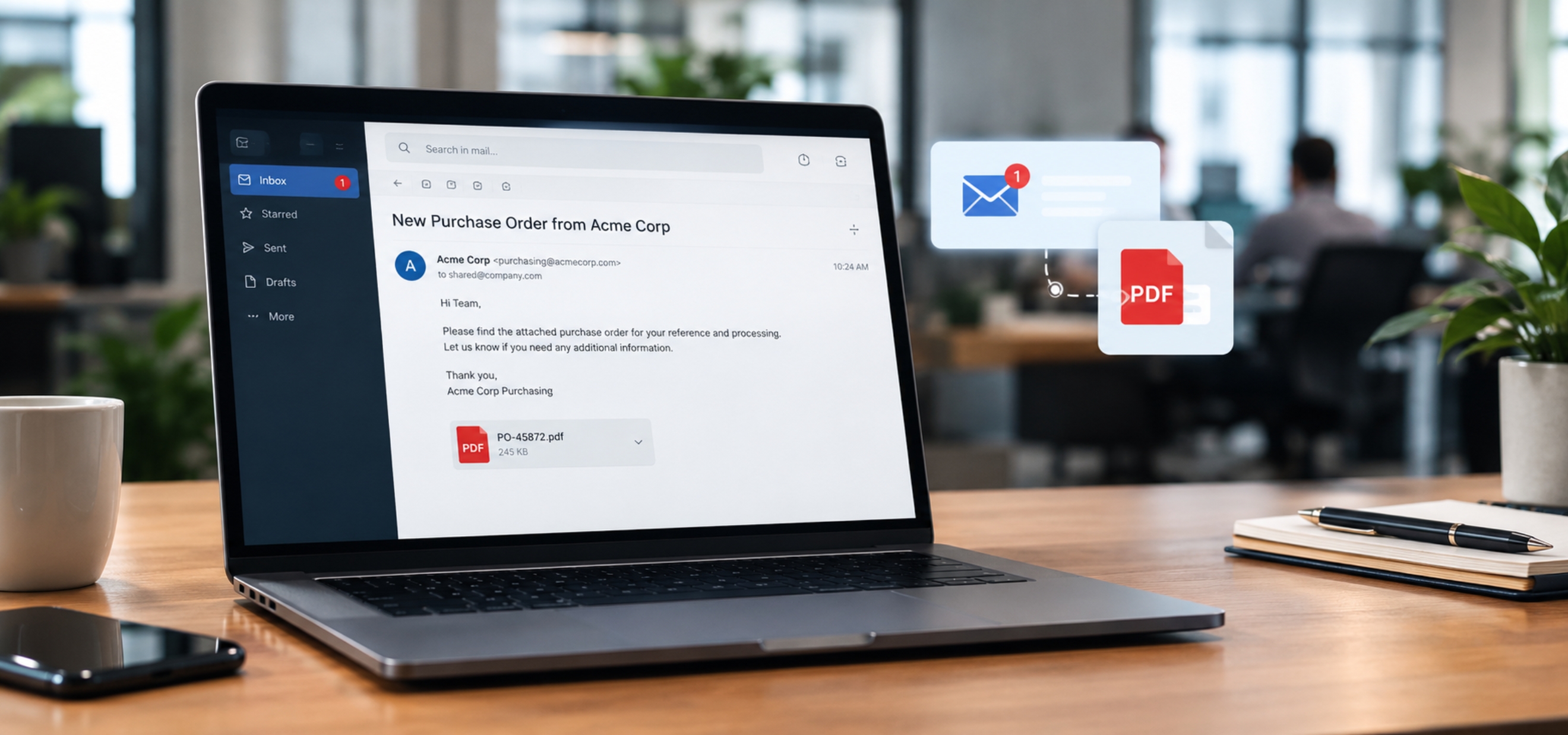
A customer sends a purchase order.
Usually, it comes through email as a PDF.
Someone from the sales or procurement team opens it, looks through the products, checks the quantities, figures out which SKUs those products correspond to, and then starts entering everything into the ERP.
If the PO has five products, nobody really worries about it.
But what happens when it has 50 products?
What happens when you receive 100 of these POs in a day?
And what happens when every customer uses a slightly different product code or description?
This is where a process that looks very small from the outside starts becoming a serious operational cost.
The company already has an ERP.
The customer already has a digital purchase order.
The email is digital.
The PDF is digital.
The product catalogue is digital.
The customer master is digital.
The pricing information is digital.
Yet someone is still sitting in front of a computer, reading one system and typing information into another.
That is the part I find interesting.
Because the real problem is not that companies don't have technology.
The problem is that the information already exists, but it is not automatically moving from one business process to the next.
And that is exactly where I believe AI can make a much bigger difference than simply reading documents.
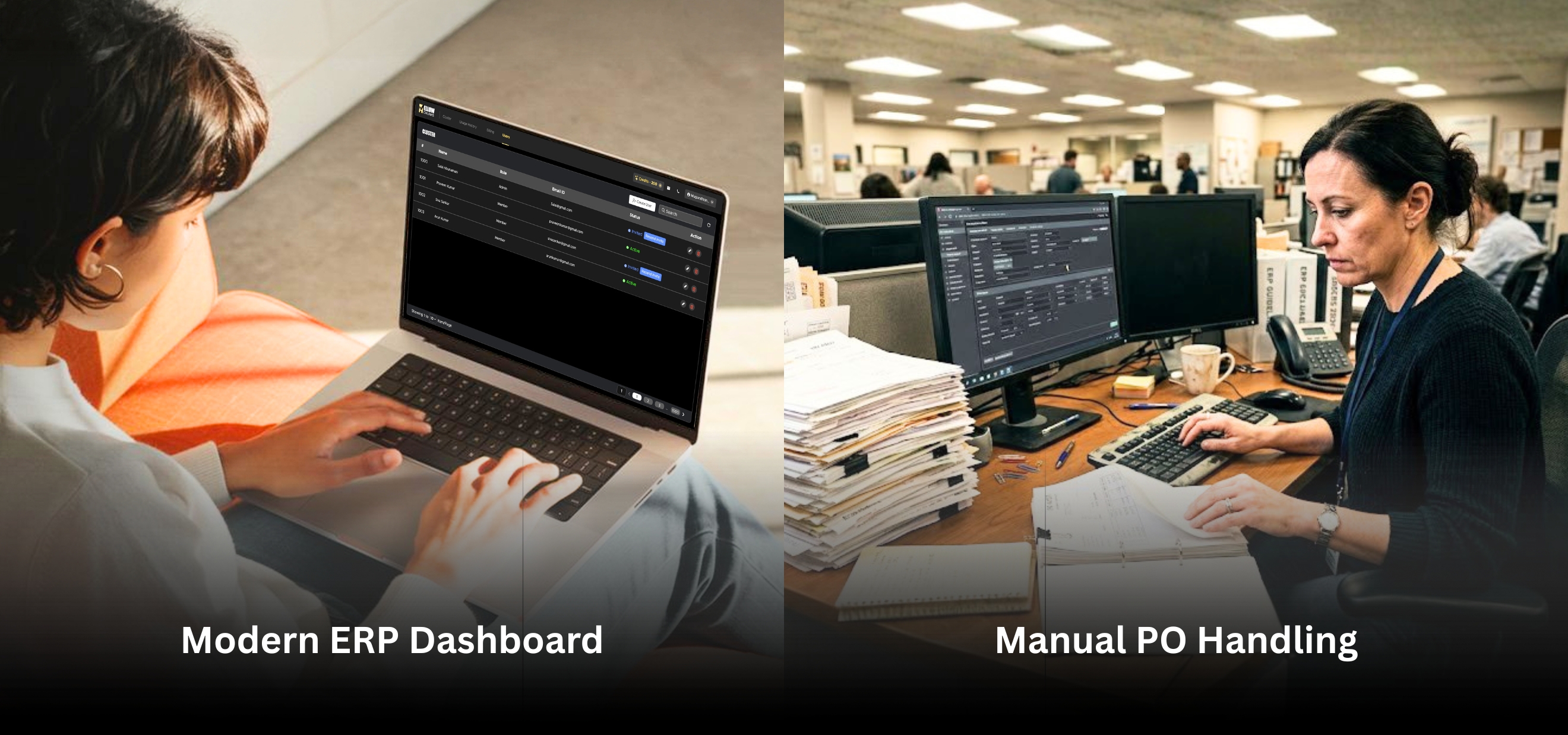
Let's start with what happens after a customer sends a PO
Imagine you are running a wholesale distribution business.
You sell hundreds or thousands of products to dealers, retailers, contractors, or other businesses.
You have an ERP such as Microsoft Dynamics 365.
Your customers don't necessarily order products in the same way.
One customer might send:
ABC-123 | 100 units
Another might send:
Product: ABC 123 Premium | Qty: 100
Another might use the manufacturer's part number.
Another might use the description printed on your catalogue.
Another customer might simply write:
Premium Cable 2.5mm | 10 Boxes
The products may still be the same products sitting in your ERP.
But the information arriving from the customer does not necessarily look the same as the information stored inside your ERP.
So somebody has to interpret it.
That person may need to identify the customer, understand which products they are referring to, map the customer's product reference to the company's SKU, check the quantity, check the unit, verify pricing, look at discounts, check availability, and then create the transaction.
Only after all of that does the next process begin.
Depending on the business, that may mean creating a sales order, preparing a delivery order, allocating inventory, sending the order to the warehouse, arranging fulfilment, and eventually generating an invoice.
So when we say "automate purchase order processing," we are not really talking about extracting text from a PDF.
We are talking about automating everything that happens because that PDF arrived.
That distinction is important.
OCR can read the PO. But reading is not the difficult part.
This is where a lot of discussions around document automation start.
Someone says
"We can use OCR to extract the information."
Technically, that is true.
OCR can identify text.
It can tell you that a document contains:
Customer: ABC Trading
PO Number: 45872
Product: XYZ-500
Quantity: 100
Price: 25.00
But the business problem doesn't end there.
The system now has to answer a much more important question.
What does this information mean in the context of this company?
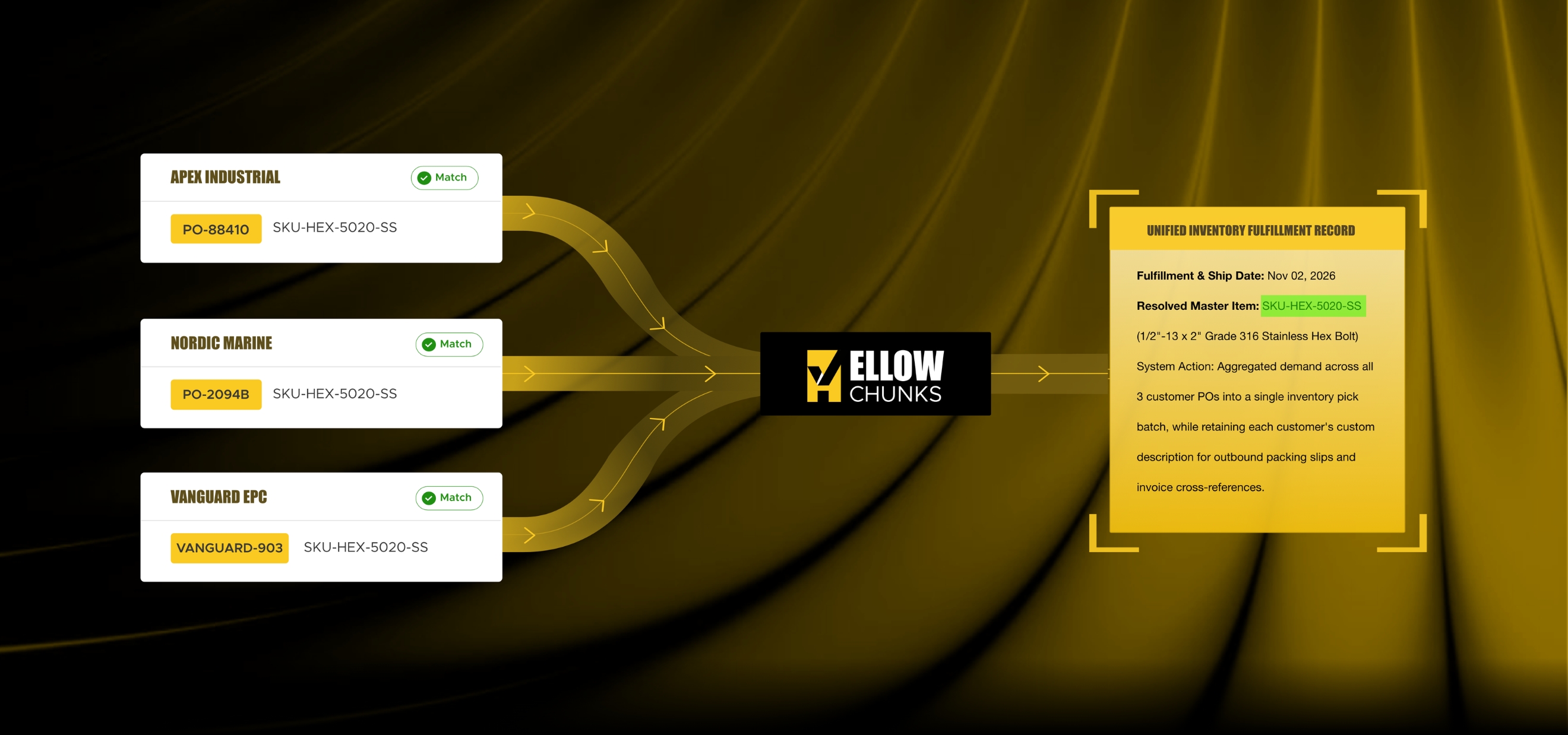
Suppose the customer's PO says:
"Samsung 55 inch Smart TV"
Your ERP might have:
TV-SAM-55-UA-01
Another customer may write:
"Samsung 55 Smart UHD"
Another may write:
"SAMSUNG TV 55"
Another may use a customer-specific code:
SAM55
And your sales team may know that all four refer to the same internal SKU.
OCR doesn't solve that problem.
It can read the words.
The business needs the system to understand the relationship between those words and the company's product master.
This is where AI becomes much more interesting.
The real challenge is SKU mapping
For me, this is one of the most important parts of the entire automation journey.
If you speak to a company that receives a large number of purchase orders, ask them one simple question:
"Does every customer use your exact ERP SKU when placing an order?"
In many businesses, the answer will be no.
And that creates a surprisingly large amount of manual work.
Let's say your internal ERP has:
SKU: CAB-2.5-CU-100
The customer might write:
2.5mm Copper Cable 100m
Another customer might write:
2.5 Cu Cable
Another might write:
Copper wire 2.5 mm
Another might use their own code:
CUS-7842
Another might use a manufacturer part number.
The person processing the order already knows what the customer means because they have experience with the account.
They may have processed the same customer's orders for years.
They understand that "2.5 Cu Cable" means a particular product.
They know that this customer's "box" means 100 pieces.
They know that another customer's "carton" contains 20 units.
They know that one customer uses a shortened product name.
They know that another customer uses an old product code.
That knowledge is sitting inside people's heads.
That is the knowledge we need to bring into the automation.
And this is why I don't think purchase order automation should be treated as a simple OCR problem.
It is a document understanding and business context problem.
A purchase order is not just a document
This is another way of looking at it.
A purchase order is a business event.
A customer is saying:
"I want these products, in these quantities, under these terms, delivered to this location."
The PDF or email is simply the way that information arrives.
Once you look at it that way, the automation opportunity becomes much bigger.
The system doesn't just need to understand the document.
It needs to understand the business transaction represented by the document.
That means identifying:
Who is the customer?
What is the PO number?
Is this a new PO or a revised PO?
Which products are being ordered?
What internal SKUs do those products correspond to?
What quantity is being requested?
What unit is being used?
What price has been mentioned?
Is there a discount?
What delivery location is requested?
Are there special instructions?
Does the customer have agreed pricing?
Are the products active?
Are the requested quantities possible?
Has the same PO already been processed?
Only after answering those questions can the system safely create a transaction.
That is the difference between extracting information and actually automating a business process.
Now imagine receiving 100 POs every day
This is where the economics start becoming interesting.
Suppose a company receives 100 purchase orders every working day.
Even if each PO takes only 10 minutes to process, that is around 16 hours of manual processing every day.
And that is assuming everything goes smoothly.
In reality, some POs take two minutes.
Some take 15 minutes.
Some take 30 minutes because the customer has used unfamiliar product descriptions.
Some need a phone call.
Some have a price mismatch.
Some contain products that are no longer active.
Some contain duplicate line items.
Some have revised quantities.
Some have a scanned PDF that is difficult to read.
Some have multiple attachments.
Some have a purchase order in one attachment and supporting documents in another.
The average time can therefore become much higher than people initially expect.
But the cost isn't only employee time.
There is another cost that is much more important.
Errors.
A human being entering 50 or 100 line items every day can make mistakes.
A quantity can be entered incorrectly.
A SKU can be selected incorrectly.
A decimal can be missed.
A unit can be misunderstood.
A discount can be missed.
A duplicate PO can be entered.
A revised PO can be processed as a new order.
And sometimes the error isn't discovered until the warehouse is already working on the order.
At that point, the cost of the mistake is much higher.
The hidden cost of manual order entry
This is something companies often underestimate.
When we talk about automation, we usually calculate the number of employees involved.
For example:
"Two people are processing POs."
So the first thought is:
"Can we save the cost of two people?"
I don't think that should be the main conversation.
The better question is:
What higher-value work could those two people be doing if the system handled the repetitive part?
Instead of reading PDFs and typing line items, the team could spend more time on customer communication, order exceptions, supplier coordination, fulfilment issues and sales support.
And there is another advantage.
When the system handles the repetitive work, people can focus on the transactions that actually require judgment.
That is a much healthier model for automation.
Not:
Human vs AI
But:
AI handles the predictable work. Human handles the exceptions.

Good automation should know when to stop
This is probably one of the most important principles in this entire discussion.
A bad automation system tries to automate everything.
A good automation system knows when it should ask a person.
Suppose an AI system receives a PO and identifies a product with 98% confidence.
Fine.
It can continue.
Now suppose it finds another product and there are three possible matches in the ERP.
Should it randomly choose one?
Absolutely not.
It should stop.
It should say:
"I found three possible product matches. Please confirm."
A human confirms it.
The system learns from that confirmation.
Next time the same customer uses that description, the system has more context.
This creates a very practical human-in-the-loop process.
The objective is not to remove humans from the workflow.
The objective is to remove humans from the parts of the workflow where their judgment isn't needed.
Let's look at a real example
Imagine a distributor receives this PO from a customer.
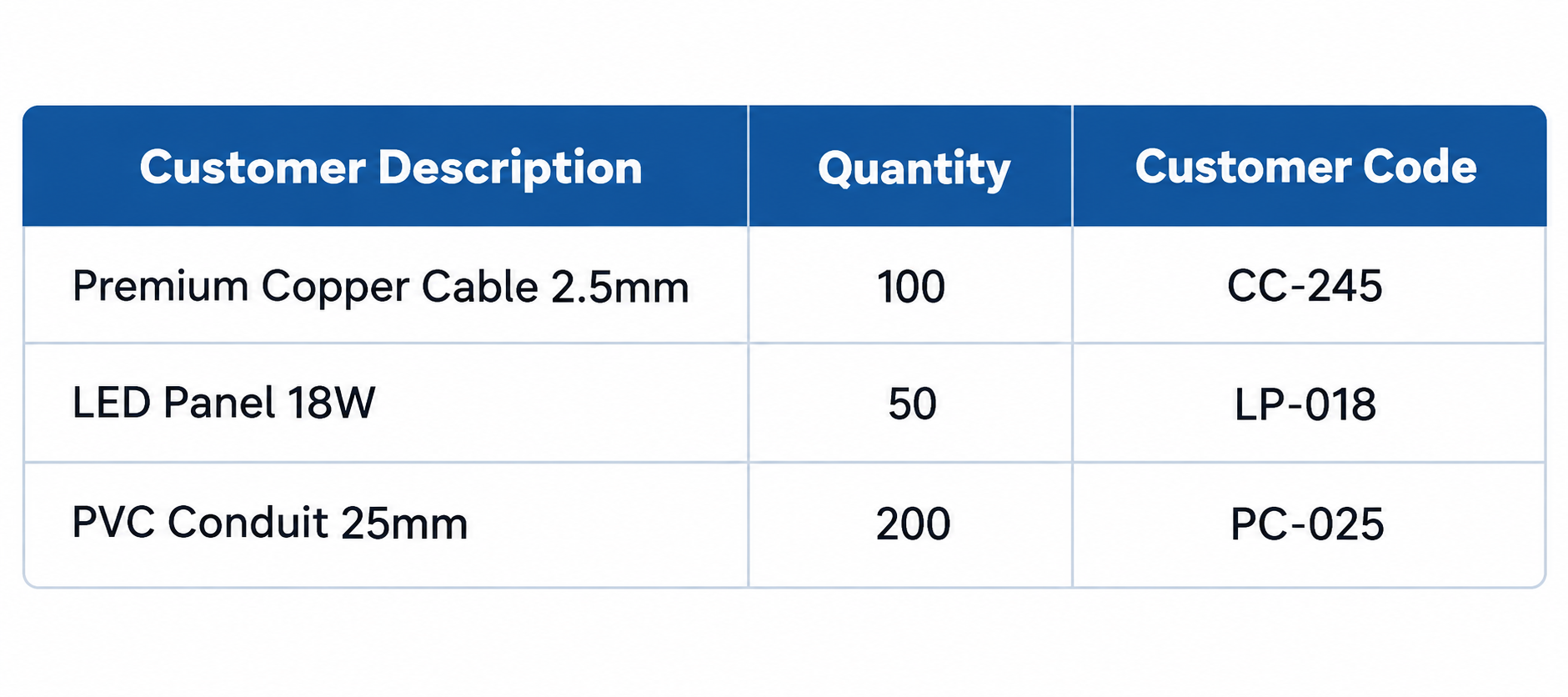
The ERP has completely different product information.
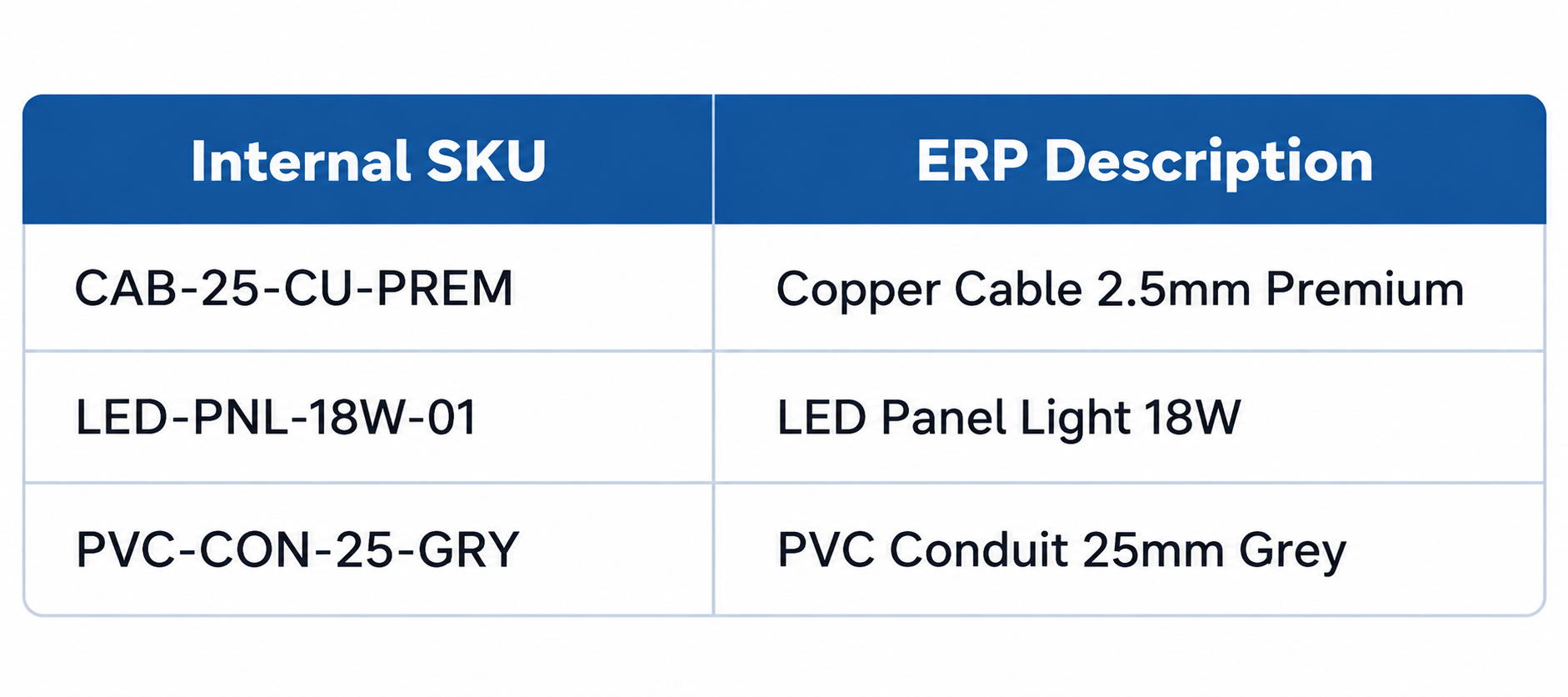
A traditional OCR system can extract the three customer descriptions.
But someone still needs to decide:
CC-245 = CAB-25-CU-PREM
LP-018 = LED-PNL-18W-01
PC-025 = PVC-CON-25-GRY
Now add another complication.
The customer normally orders the grey conduit.
But this PO doesn't specify colour.
Should the system automatically select grey?
Maybe.
But only if the company's business rules allow that assumption.
If there are multiple possible variants, it should flag the line.
This is where business context matters.
The system needs product memory
Over time, the automation should become better at understanding each customer.
For Customer A:
"CC-245" always means CAB-25-CU-PREM.
For Customer B:
"Copper Cable 2.5" means CAB-25-CU-PREM.
For Customer C:
"2.5mm Copper Wire" may refer to a different SKU.
That means product matching cannot always be global.
It can be customer-specific.
This is a very important concept.
The system isn't simply learning what a product is.
It is learning:
How this particular customer refers to this particular product.
That relationship can become extremely valuable over time.
And it is one of the reasons AI-based automation can become more useful as the system processes more transactions.
What about pricing?
Now we get into another area where document automation becomes more than document extraction.
A PO may contain a price.
For example:
Product A: 100 units × AED 25
But your ERP may have an agreed customer price of AED 24.
What should happen?
Or perhaps the customer has a contract with a 5% discount.
Or perhaps the price applies only when ordering above a certain quantity.
Or perhaps the PO contains an old price.
The system needs to distinguish between:
What the customer requested
and
What the business is allowed to accept automatically.
That is a business rule.
And this is why I would not recommend designing a PO automation system as:
PDF → AI → ERP
It needs more steps.
A better architecture is:
Document → Understanding → Business Context → Validation → Decision → ERP
The validation layer is critical.
Quantity is not always as simple as it looks
This is another area that sounds trivial until you see real purchase orders.
A customer might order:
100 pieces
Another might order:
10 boxes
Another:
5 cartons
Another:
2 pallets
The ERP may maintain the product in pieces.
One box may contain 10 pieces.
One carton may contain 50 pieces.
One pallet may contain 500 pieces.
So the system needs to understand the unit of measure.
If the PO says:
10 cartons
and one carton contains 50 units, the system may need to translate that into:
500 units
But what if the customer's definition of carton is different?
Or what if the product packaging changed?
Or what if the PO says 10 boxes but the ERP doesn't have a packaging conversion?
Again, the system shouldn't guess.
It should use known business rules and escalate the exception when necessary.
Duplicate POs are another problem people forget
Let's say a customer sends a PO at 10:02 AM.
Your team receives it.
Then, at 10:15 AM, the customer sends the same PO again because they didn't receive an acknowledgement.
At 10:20 AM, someone forwards it internally.
Now the same document exists in three different emails.
A manual process can easily create confusion.
An automated system can check:
Customer
PO number
PO date
Document hash or similarity
Line items
Quantities
Revision number
Previous transaction status
The system can then identify that the PO may already exist.
Instead of creating another order, it can flag the document.
That is not just document extraction.
That is transaction control.

Revised purchase orders make this even more interesting
Consider this sequence.
At 9:00 AM:
PO 45872
100 units of Product A.
At 11:00 AM:
PO 45872 REV 1
120 units of Product A.
At 2:00 PM:
PO 45872 REV 2
80 units of Product A and 20 units of Product B.
The system needs to understand that these aren't three independent orders.
They are three versions of the same business request.
A good automation workflow should identify the relationship between them.
It should determine what has changed.
It may need to update the existing transaction rather than create a new one.
This is another reason why simply extracting text isn't enough.
The system needs transaction awareness.
Email should be part of the automation
This is something I think companies should pay more attention to.
Many businesses don't receive purchase orders through a sophisticated API.
They arrive through email.
Sometimes the customer sends:
"Please find attached our purchase order."
That's it.
The actual transaction is hidden inside the attachment.
So why should a human have to open the email, download the PDF, read it, enter the information and then move to the ERP?
The email itself can become the starting point of the workflow.
A practical architecture could look like this:
Customer Email
↓
Attachment Detection
↓
Document Classification
↓
PO Extraction
↓
Customer Identification
↓
SKU Mapping
↓
Business Rule Validation
↓
Exception Detection
↓
Human Approval if Required
↓
ERP Transaction Creation
↓
Delivery Workflow
This is where the automation becomes meaningful.
The employee doesn't need to start the process.
The arrival of the document starts the process.
What happens inside the AI layer?
Let's break it down because this is where many solutions become unnecessarily complicated.
The first step is document classification.
The system needs to understand:
Is this a purchase order?
Is it an invoice?
Is it a delivery document?
Is it a quotation?
Is it a revised PO?
Is it something else?
Once it knows that, it can apply the appropriate workflow.
Then comes extraction.
The system identifies the fields and line items.
But after extraction, it needs context.
For example:
Customer = ABC Trading
Now the system can retrieve the relevant customer information.
Then:
Product = "Premium Cable 2.5mm"
The system can search the relevant product catalogue.
It may consider:
Customer SKU
Internal SKU
Manufacturer part number
Previous orders
Customer-specific aliases
Product description
Product category
Product attributes
Unit of measure
Historical mappings
The system then produces a candidate match.
That candidate goes through validation.
Only then should it become an ERP transaction.
Confidence scores can make this practical
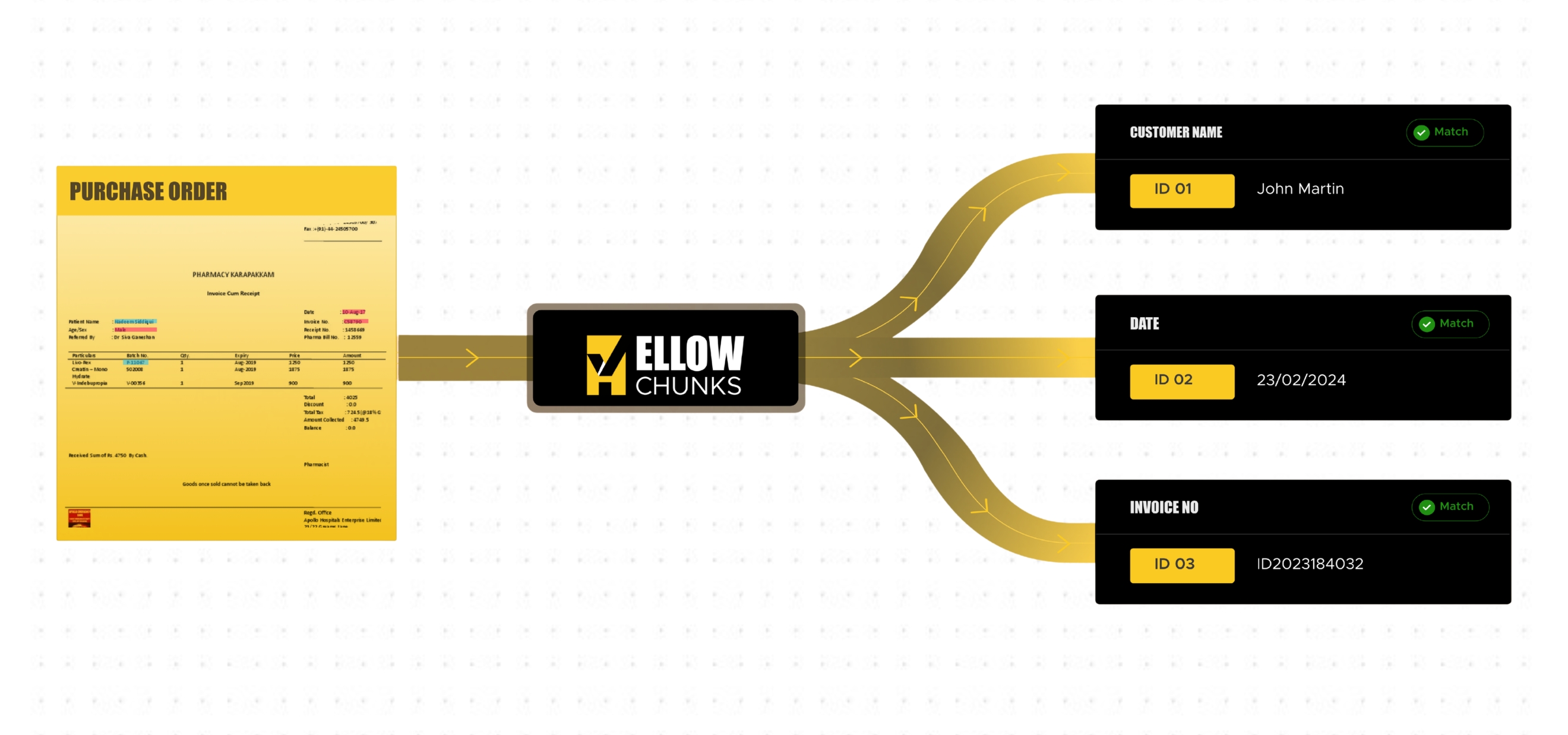
One approach is to assign confidence to each decision.
For example:
Customer identification: 99%
PO number extraction: 100%
Product line 1 mapping: 98%
Product line 2 mapping: 96%
Product line 3 mapping: 61%
The first two can move forward.
The third can be sent for review.
This is much better than asking an employee to manually review every line.
The employee only sees the uncertain part.
Imagine a 50-line PO.
If AI is confident about 47 lines and uncertain about three, the human reviews three.
That can dramatically change the nature of the work.
The human becomes an exception manager rather than a data-entry operator.
The exception queue becomes important
If you automate this properly, you don't want a system where every error creates an email saying:
"Something went wrong."
That isn't useful.
You want a structured exception queue.
For example:
PO 45872
Customer: ABC Trading
Status: Needs Review
Reason:
Product "Premium Cable 2.5mm" matched three possible SKUs.
Possible matches:
CAB-25-CU-PREM
CAB-25-CU-STD
CAB-25-CU-IND
Human selects the correct product.
Then the transaction continues.
The system should also capture the decision.
That creates a feedback loop.
The next time the same customer sends:
Premium Cable 2.5mm
the system may have enough historical context to identify the correct SKU with much higher confidence.
That is where the AI layer becomes more useful over time.
The ERP should remain the system of record
I don't think AI should replace the ERP.
The ERP already knows things that are critical to the business.
It knows:
Customers
Vendors
Products
Inventory
Pricing
Discounts
Orders
Delivery locations
Tax information
Financial information
Transaction history
Business rules
The AI layer should sit around the ERP and make information easier to understand and move into it.
Think of it as an intelligent layer between unstructured business communication and structured business systems.
The customer doesn't need to change how they order.
The employee doesn't need to manually enter everything.
The ERP remains the source of truth.
AI simply helps bridge the gap.
Why Microsoft Dynamics 365 is an interesting example
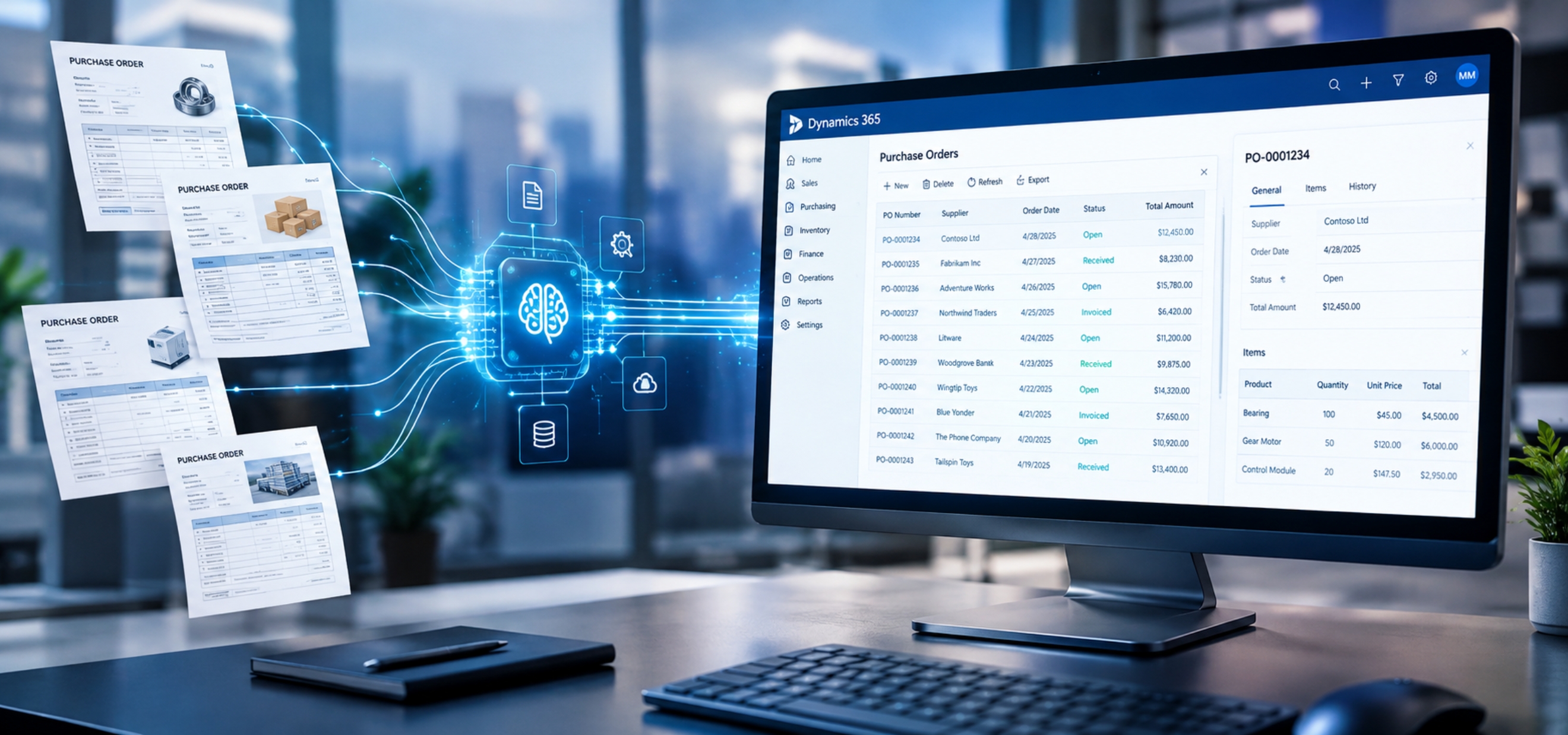
Many companies have already invested significantly in ERP systems such as Microsoft Dynamics 365.
The problem is not that their ERP cannot process orders.
It can.
The problem is that the information often reaches the ERP through manual work.
A customer sends a PDF.
An employee reads it.
The employee interprets the information.
The employee enters the information into the ERP.
The ERP then does what it was designed to do.
So the missing piece is often not another ERP feature.
It is the intelligent connection between the incoming document and the ERP transaction.
This is particularly relevant for organizations where the ERP is already handling purchasing, sales, inventory and fulfilment processes but incoming orders still arrive in inconsistent document formats.
The opportunity is to automate the front end without disrupting the existing ERP.
This is where Yellowchunks comes in
When we started looking at this problem, one thing became clear to us.
We didn't want to build another tool that simply says:
"Upload your PDF and we'll extract the text."
There are already many tools that can do that.
The bigger question was:
"What should happen after the document is understood?"
That led us to the way we think about Yellowchunks.
Yellowchunks is designed around AI-powered document automation, but the document is only the starting point.
The objective is to take an incoming business document and turn it into a structured business action.
For a wholesale or distribution business, that could mean taking a customer purchase order from an email and moving it through understanding, validation and SKU mapping until the information is ready to enter the ERP.
The interesting part is not the PDF.
The interesting part is what happens next.
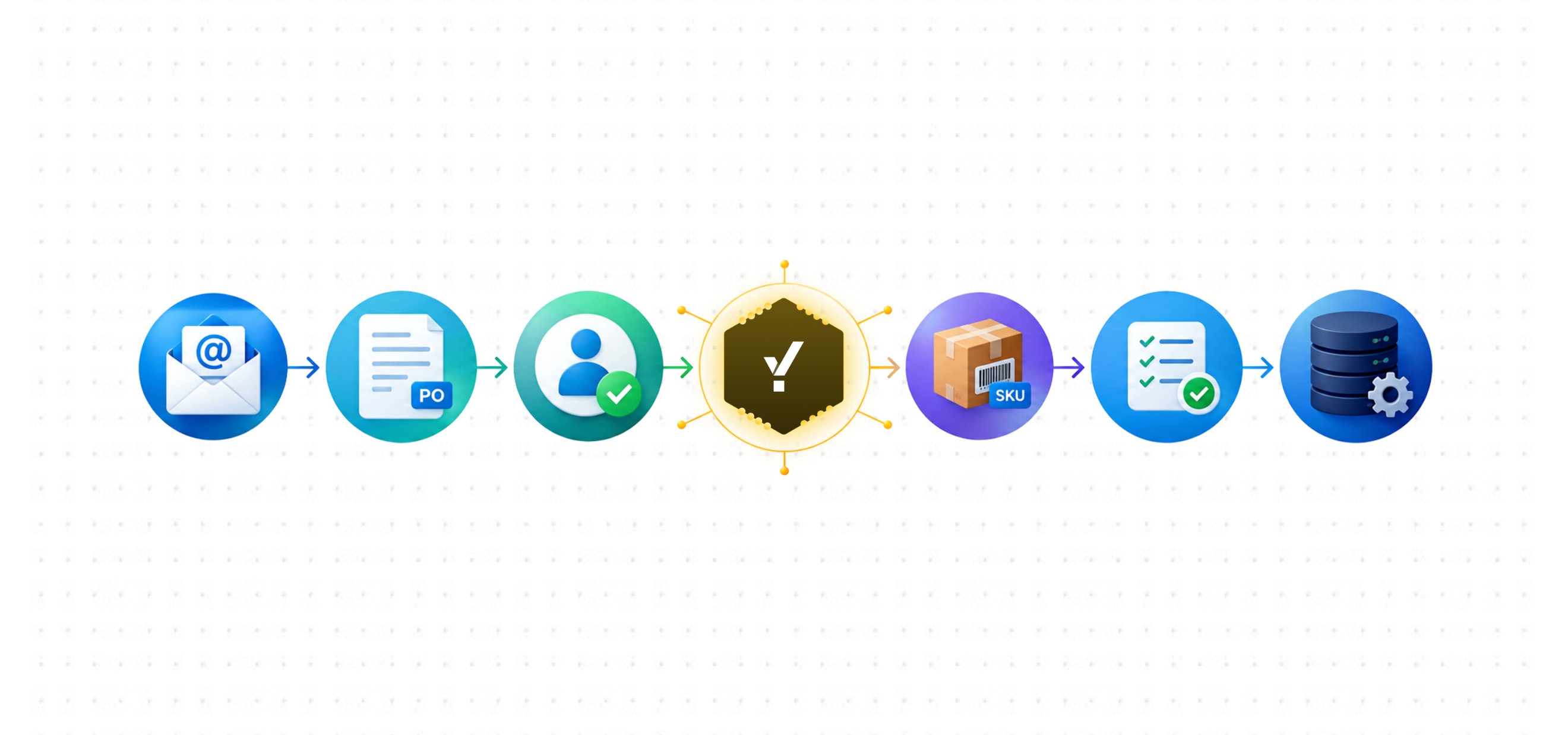
A typical Yellowchunks PO workflow
Let's take the complete journey.
A customer sends an email.
The email contains a purchase order.
Yellowchunks receives the document.
The system first identifies the customer.
It then identifies the document type.
It extracts the PO number, date, delivery information and line items.
Then comes product understanding.
The system looks at the customer's description or product code and tries to map it to the company's internal product catalogue.
It can use customer-specific mappings, historical transactions and available product information to improve the match.
Then it checks the quantities and units.
It checks pricing and applicable business rules.
It checks whether there are potential duplicates.
It checks whether there are unresolved exceptions.
If everything is within the defined rules, the transaction can continue automatically.
If something needs human confirmation, it is sent to the appropriate person.
Once approved, the structured information can be passed into the ERP.
From there, the existing order fulfilment process can continue.
That is a much more useful definition of automation.
What if the PO has 200 line items?
This is where the difference becomes even more obvious.
Nobody really cares about automating a three-line PO.
It takes a few minutes.
The real operational pressure starts when documents become large and frequent.
Imagine a distributor receiving 200 purchase orders every day.
Some have five lines.
Some have 20.
Some have 100.
Some have 200.
Now the amount of repetitive work becomes significant.
And the larger the document, the greater the opportunity for manual errors.
An AI system can process the document at the line-item level.
Instead of an employee manually entering 200 lines, the system can process the lines and present only the uncertain items for review.
The employee might end up reviewing 10 lines instead of entering all 200.
That is a very different workflow.
The goal isn't 100% automation
This is another point where I think companies should be realistic.
People sometimes ask:
"Can AI automate 100% of our purchase orders?"
Maybe in some very controlled environments.
But I don't think that should be the starting target.
A better question is:
"How much of our PO processing can be automated safely?"
Suppose your current process requires a person to touch every PO.
After automation:
60% of POs require no intervention.
25% require a quick review.
10% have pricing or product exceptions.
5% require deeper investigation.
That can still be a major improvement.
The objective isn't to remove every human decision.
It is to make sure humans are spending their time on decisions that actually need humans.
What happens to the operations team?
This is an important question because automation discussions often create unnecessary fear.
If a team currently spends most of its time entering purchase orders, the answer should not automatically be:
"We need fewer people."
The better question is:
"What work can the team now do that the business wasn't able to focus on before?"
They can follow up on delayed orders.
They can handle customer exceptions.
They can resolve pricing disputes.
They can work with suppliers.
They can monitor inventory.
They can improve customer service.
They can support sales.
They can identify recurring ordering problems.
They can look at why certain customers keep sending incorrect information.
In other words, automation can move the team from processing transactions to managing the business around those transactions.
That is a much more valuable role.
The Middle East is an interesting market for this
I have been particularly interested in this problem in the Middle East.
Across the UAE, Saudi Arabia and the wider GCC, there are a large number of businesses operating in distribution, wholesale, retail supply, manufacturing and trading.
Many of these organizations already use ERP systems.
They have structured product catalogues.
They have customer databases.
They have established sales and fulfilment processes.
But the information coming into those systems can still arrive through email, PDF and other semi-structured formats.
That creates an interesting gap.
The back office is digital.
The front end of the transaction is often still manual.
And that gap is exactly where AI document automation can be useful.
The broader AI conversation in the GCC is also moving from experimentation toward practical business use, although many organizations are still working through the challenge of turning pilots into scaled operational value.
For me, that makes practical automation use cases more interesting than simply talking about AI as a technology.

Wholesale and distribution may be one of the strongest use cases
Think about the nature of wholesale.
You have a large number of products.
You have many customers.
Customers order frequently.
Each customer may have different terminology.
The same product may be described in different ways.
Orders arrive through different channels.
The company has pricing rules.
There are quantities and units to validate.
There are delivery locations.
There are inventory considerations.
And everything eventually needs to become a structured transaction.
That is almost a perfect environment for document automation.
The more repetitive the transaction, the greater the opportunity.
The more variation there is in the input, the more valuable an intelligent interpretation layer becomes.
Suppliers have the same problem
The same thinking applies on the procurement side.
Imagine a company receiving supplier quotations, invoices, delivery documents and order confirmations.
The documents may look different depending on the supplier.
The information may be formatted differently.
Supplier product codes may not match internal product codes.
The company may need to compare information across documents.
For example:
Purchase Order
versus
Supplier Order Confirmation
versus
Goods Receipt
versus
Invoice
Now the system isn't just reading individual documents.
It is comparing business documents against each other.
That opens up another layer of automation.

From document automation to transaction intelligence
This is where I think the category is heading.
The first generation of document automation was largely about:
"Can we extract information from this document?"
The next stage is:
"Can we understand the information?"
Then:
"Can we validate it against business rules?"
And eventually:
"Can we take the correct business action?"
That progression is important.
Because businesses don't really want extracted data.
They want outcomes.
They want an order created.
They want a delivery processed.
They want an exception flagged.
They want an invoice matched.
They want a customer request routed.
They want the next step to happen without someone manually moving information between systems.
That is the opportunity.
The biggest mistake is automating the wrong part
I have seen many discussions around AI where the focus becomes:
"Which model should we use?"
"Which OCR engine?"
"Which LLM?"
"Which document parser?"
Those are valid technical questions.
But they aren't the first questions I would ask.
I would start with:
What happens today?
Then:
Where does a human have to interpret information?
Then:
What decision does the human make?
Then:
What data does that decision depend on?
Then:
What happens after the decision?
Once you understand that chain, the technology becomes much easier to design.
Otherwise, you can build a very impressive document extraction system that doesn't actually solve the operational problem.
Don't automate the document. Automate what happens because of the document.
That sentence captures how I think about this.
A purchase order arriving in an inbox is not the problem.
The problem is what the organization has to do after it arrives.
Someone has to understand it.
Someone has to identify the customer.
Someone has to map the products.
Someone has to validate the quantities.
Someone has to check the pricing.
Someone has to make sure it isn't a duplicate.
Someone has to put it into the ERP.
Someone has to trigger the next operational step.
If AI can safely handle most of those activities, then we have created something much more valuable than an OCR system.
We have automated a business process.
What does a good implementation look like?
I wouldn't recommend trying to automate everything on day one.
Start with a specific workflow.
For example:
Customer PO → ERP order creation
Choose a group of customers.
Choose a defined product category.
Understand the existing process.
Document the exceptions.
Then build the automation around those rules.
Once the system is working reliably, expand.
Maybe the next stage is more customers.
Then more product categories.
Then more document formats.
Then pricing validation.
Then duplicate detection.
Then delivery workflow.
Then invoice matching.
This approach makes the automation measurable.
You can see where it is working.
You can see where it is failing.
And you can improve it based on real transactions.

What should IT teams look at?
If I were an IT or ERP head evaluating a PO automation solution, I would not start by asking:
"Does it have AI?"
Almost every solution today will say yes.
I would ask much more practical questions.
Can it understand different PO formats?
Can it process email attachments automatically?
Can it identify the customer?
Can it map customer SKUs to internal SKUs?
Can it learn customer-specific product descriptions?
Can it handle different units of measure?
Can it validate pricing?
Can it identify duplicates?
Can it recognise revised POs?
Can it integrate with our ERP?
Can it show why it made a particular decision?
Can a human review uncertain transactions?
Can we configure business rules?
Can we track every transaction?
Can we see what the system changed?
Can we control what gets automatically posted?
Those questions tell you much more about whether the solution is useful.
What should Procurement and Supply Chain teams look at?
The questions are slightly different.
They should ask:
How much time does the team spend entering orders?
How many orders arrive every day?
How many line items are processed?
How often do customers use incorrect or unfamiliar product descriptions?
How often do pricing mismatches happen?
How often are duplicate or revised POs received?
How many orders require manual clarification?
How often do order-entry errors reach the warehouse?
How long does it take from receiving a PO to creating the transaction?
How much time is spent checking information that could potentially be validated automatically?
These numbers will tell you whether there is a real automation opportunity.
Measure the process before measuring the AI
This is something I strongly recommend.
Before implementing automation, measure the existing process.
For example:
Average POs per day
Average line items per PO
Average processing time
Percentage requiring manual clarification
Percentage with product mapping issues
Percentage with pricing issues
Percentage with duplicate/revised PO issues
Average time from PO receipt to ERP entry
Number of order-entry errors
Then measure the same things after automation.
This gives you a much better picture of value.
Instead of saying:
"Our AI is 95% accurate."
You can say:
"Average PO processing time reduced from X minutes to Y minutes."
Or:
"The team now manually reviews only the transactions that require attention."
That is the language a business leader can understand.
There is also a data quality benefit
Something interesting happens when you automate a process like this.
You start discovering problems in the underlying master data.
For example:
You may discover that the same product has five different descriptions.
You may discover that customers are using old SKUs.
You may discover that packaging information isn't maintained properly.
You may discover that certain customers have undocumented pricing arrangements.
You may discover that some products are inactive but still appearing in customer orders.
You may discover that employees have been compensating for these problems manually for years.
That is valuable information.
Automation doesn't just reduce manual work.
It exposes the places where the business itself needs better data.
AI can help uncover these patterns
Imagine the system processing thousands of purchase orders.
It notices that Customer A repeatedly calls a product:
"Blue 25mm pipe"
while the ERP calls it:
PVC-CON-25-BLU
The system can learn the mapping.
But now imagine it discovers that five customers use different descriptions for the same product.
That information can be useful to the business.
Maybe those aliases should be formally added to the product master.
Maybe the sales team should update the catalogue.
Maybe the customer should be given a standardized ordering reference.
So the automation can eventually help improve the process that feeds it.
What happens after PO automation?
This is where the opportunity gets even bigger.
Once you successfully automate purchase order processing, you have already created several useful building blocks.
You have:
Customer understanding.
Product understanding.
Document understanding.
Business rule validation.
ERP integration.
Exception management.
Transaction history.
Those same capabilities can be applied to other workflows.
For example:
Invoice processing
Quotation processing
Order confirmations
Delivery documents
Goods receipt documents
Proof of delivery
Credit notes
Supplier documents
Customer onboarding documents
The technology doesn't have to start from zero each time.
The underlying intelligence can become a business document layer.
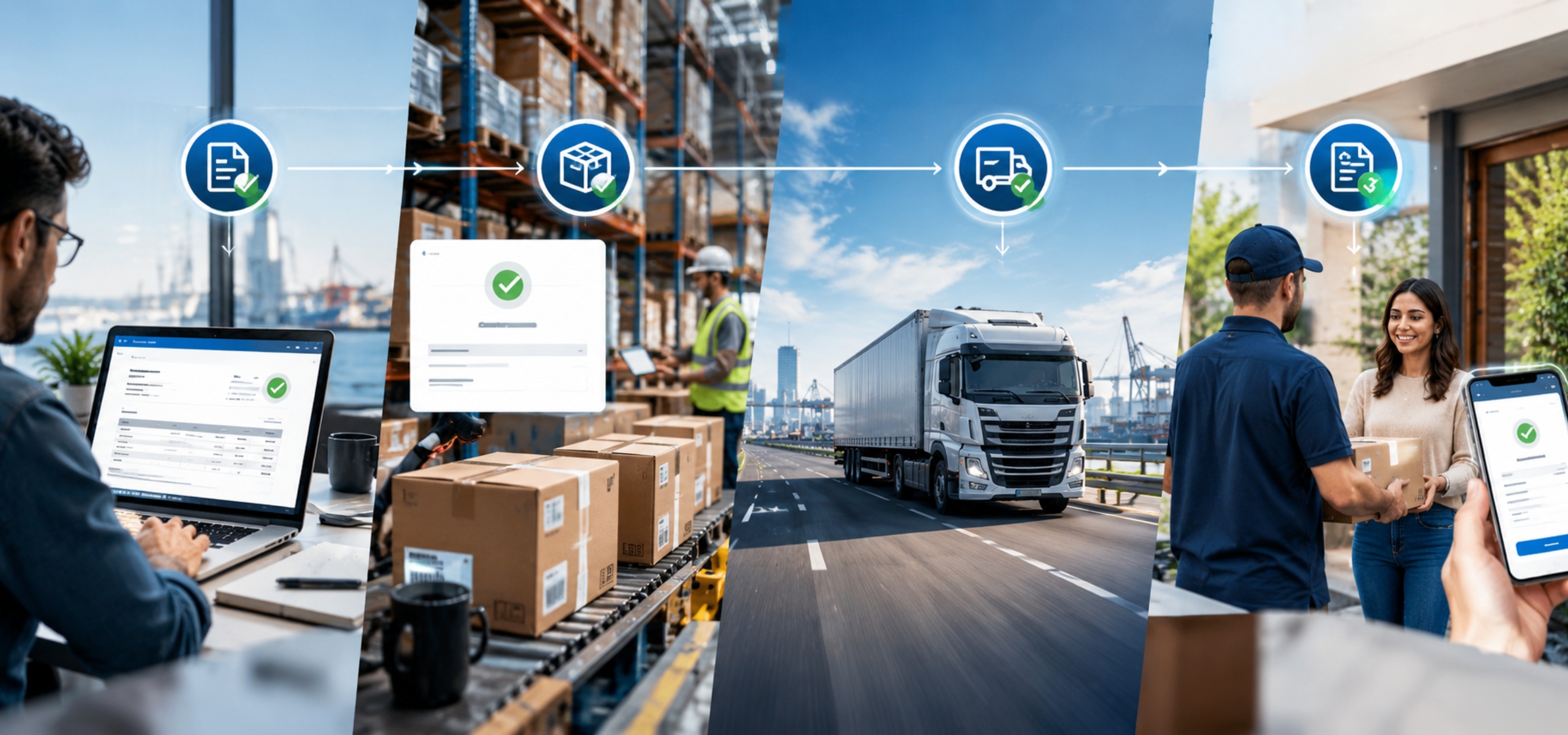
Imagine a connected document workflow
A customer sends a PO.
AI understands it.
The order is created.
The supplier receives the requirement.
The supplier sends an order confirmation.
AI compares the confirmation against the original PO.
A delivery document arrives.
AI matches it against the order.
The invoice arrives.
AI matches the invoice against the PO and delivery information.
Now you have a much bigger opportunity.
Instead of automating one document, you're automating the flow of information across the transaction lifecycle.
That is where I think the long-term value becomes much more significant.
The future isn't about replacing ERP
I don't think companies need to replace their ERP to benefit from AI.
In many cases, the opposite is true.
The ERP remains extremely important.
The opportunity is to make the ERP more accessible to unstructured business information.
Customer emails are unstructured.
PDFs are semi-structured.
Scanned documents are difficult to process.
Natural language is inconsistent.
Human communication is messy.
ERP systems are structured.
They expect specific fields.
They expect specific products.
They expect specific customers.
They expect specific units.
AI can act as the interpretation layer between the two.
That is a much more practical way to think about enterprise AI.
The question I would ask every wholesale business
If I were sitting with a wholesale or distribution company today, I wouldn't start by asking:
"Are you using AI?"
I'd ask:
"How does a customer purchase order become an order in your ERP?"
Then I'd ask them to show me.
Not explain it.
Show me.
Show me the customer email.
Show me the PDF.
Show me what the employee does.
Show me how the SKU is found.
Show me how the quantity is checked.
Show me how pricing is validated.
Show me what happens when the product doesn't match.
Show me how the order gets into Dynamics 365 or your ERP.
And then I'd ask:
"Which of these steps actually requires a human?"
That conversation will usually reveal much more about the AI opportunity than a generic discussion about AI transformation.

Start with the boring processes
There is a tendency to look for exciting AI use cases.
AI assistants.
AI agents.
AI copilots.
AI search.
AI content generation.
Those are interesting.
But some of the most valuable AI applications inside a business may be much less exciting.
Reading purchase orders.
Matching SKUs.
Checking quantities.
Validating prices.
Comparing documents.
Creating transactions.
Finding exceptions.
Following business rules.
These aren't glamorous problems.
But they happen every day.
And when a process happens thousands of times, even a small improvement can have a meaningful impact.
That is why I like the PO-to-DO problem
The journey from purchase order to delivery is a very practical automation opportunity.
It has a clear starting point.
Customer sends PO.
It has a clear destination.
Order is ready for fulfilment.
And between those two points there are several repetitive activities that can potentially be automated.
Document understanding.
Customer identification.
SKU mapping.
Quantity validation.
Pricing validation.
Business rule checks.
Duplicate detection.
Exception management.
ERP integration.
Delivery workflow.
You can measure the process before automation.
You can measure it after automation.
And most importantly, the business can understand what changed.
Where Yellowchunks fits
This is the problem we are interested in solving with Yellowchunks.
Not just:
"Give me the information inside this PDF."
But:
"Understand this business document, connect it to the business context, validate it, and help move the transaction to the next system."
For a wholesale or distribution company, that can mean taking customer purchase orders from email and turning them into structured ERP-ready transactions.
The system can interpret the document.
Understand the customer.
Map the products.
Validate the quantities.
Apply business rules.
Identify exceptions.
Bring a human into the loop when required.
And connect the result to the ERP workflow.
The objective is simple.
Reduce the amount of repetitive work people have to do between receiving an order and processing it.
But this isn't only about saving time
Time savings are easy to understand.
But I think there are three bigger benefits.
The first is consistency.
A system follows the same validation process every time.
The second is visibility.
You can see where orders are getting stuck and why.
The third is scalability.
If order volume doubles, you don't necessarily want manual processing effort to double with it.
That's where automation becomes strategically important.
You are not just making today's process faster.
You are creating a process that can handle more business without adding the same amount of operational effort.

And that changes the conversation around growth
Imagine a distributor wants to double its customer base.
With a heavily manual process, growth often means more operational workload.
More customers.
More POs.
More line items.
More employees.
More chances for mistakes.
But if the order-entry process is increasingly automated, the relationship between revenue growth and administrative workload can change.
That doesn't mean people become unnecessary.
It means the business can potentially grow without increasing repetitive administrative work at the same rate.
For a growing distributor, that can be a significant advantage.
AI doesn't eliminate complexity. It manages it differently.
Real businesses are messy.
Customers don't follow your preferred format.
Products have aliases.
People make mistakes.
Documents are inconsistent.
Pricing changes
Orders get revised.
Emails get forwarded.
Attachments get renamed.
Customers use old product codes.
Warehouses have different units.
ERP master data isn't always perfect.
That complexity isn't going away.
The question is:
Who or what is going to deal with that complexity?
Today, it is often an experienced employee.
Tomorrow, I think it will increasingly be a combination of AI and experienced employees.
AI handles the repetitive interpretation.
Humans handle the decisions that genuinely require judgment.
And the system learns from those decisions.
The real opportunity is between systems
This is probably the biggest takeaway I have from looking at this problem.
Most companies have already digitized individual systems.
They have CRM.
They have ERP.
They have email.
They have inventory systems.
They have procurement systems.
They have warehouse systems.
The problem often exists between them.
Information starts in one place.
A person reads it.
The person interprets it.
The person enters it somewhere else.
That human becomes the integration layer.
And humans are not particularly good integration APIs.
They get tired.
They make mistakes.
They take leave.
They interpret things differently.
They have different levels of experience.
AI can increasingly take over some of that interpretation layer.
Not by replacing every system.
But by helping information move between systems.
This is where AI becomes practical
When people ask me where I see AI creating real business value, I don't always think about the most futuristic applications.
I think about the processes where people are repeatedly doing the same thing:
Reading.
Understanding.
Comparing.
Checking.
Copying.
Validating.
Entering.
Approving.
Routing.
Those are exactly the kinds of activities where AI can be useful.
And purchase order processing is a very good example.
The document itself is only the beginning.
The real opportunity is everything that follows.

If you are an IT or ERP head, look at your inbox
Seriously.
Look at the shared mailbox where customer orders arrive.
Pick the last 20 purchase orders.
Don't start with an AI vendor.
Start by studying those 20 documents.
How different are they?
How many use your SKU?
How many use customer SKUs
How many have descriptions instead of codes?
How many have pricing?
How many have discounts?
How many have different units?
How many need clarification?
How long does it take your team to process them?
You might be surprised by how much manual interpretation is happening before the information ever reaches your ERP.
And that is probably where the automation opportunity is hiding.

If you are in Procurement or Supply Chain, ask a different question
Ask your team:
"What part of order processing do you hate doing repeatedly?"
Don't ask:
"Where can we use AI?"
The first question will probably give you a better answer.
Maybe it's entering line items.
Maybe it's checking customer codes.
Maybe it's comparing supplier confirmations.
Maybe it's checking prices.
Maybe it's searching old emails to understand what a customer meant.
Maybe it's dealing with revised documents.
Those repetitive frustrations are often the best starting points.
One last thought
We have spent the last few decades making business systems more digital.
We moved from paper files to spreadsheets.
From spreadsheets to applications.
From applications to cloud systems.
From isolated systems to integrated ERPs.
But in many businesses, one part of the process is still surprisingly manual.
A customer sends an email.
Someone opens a PDF.
Someone reads it.
Someone understands what the customer means.
Someone finds the right SKU.
Someone types the information into the ERP.
And then the digital process finally begins.
I think AI gives us an opportunity to change that.
Not because AI can read a PDF.
That's the easy part.
The interesting part is whether AI can understand the business meaning behind the PDF, apply the right context and rules, know when it is confident, know when it needs help, and then move the transaction forward.
That is a much bigger opportunity.
And it applies far beyond purchase orders.
The same thinking can be used wherever businesses receive information in one format and need to turn it into an action somewhere else.
For me, that is the real promise of AI document automation.
Don't automate the document. Automate what happens because of the document.
And if your company is still manually moving purchase order information from an email into the ERP, that may be one of the simplest places to start.
If this sounds familiar, let's look at your process
If you are an IT head, ERP head, Procurement head or Supply Chain leader and your team is still spending hours every day moving purchase order information from emails and PDFs into the ERP, I would love to see how your current process works.
Not a sales presentation.
Not a generic AI demo.
Show us how one real PO moves through your organization today.
Show us the email.
Show us the PO.
Show us how your team identifies the customer.
Show us how they map the customer's SKU to your internal SKU.
Show us how they check pricing, quantities and units.
Show us what happens when something doesn't match.
Show us what finally gets entered into Dynamics 365 or your ERP.
We can then look at that workflow and identify which parts can realistically be automated, which parts should remain with your team, and where Yellowchunks can fit into the process.
If you process a high volume of purchase orders, don't start by asking whether you need AI. Start by asking how much of the current process actually needs a person.
That is the conversation I would like to have.
If you want to explore it, send me a message with "PO AUTOMATION".
I'll be happy to walk through the process with you and see whether there is a real automation opportunity for your business.
AUTHOR

Digital Marketing Executive